
In late June 2026, a new Messages tool with a built-in AI agent briefly appeared in some Google Business Profile dashboards, then disappeared within hours. The reported sightings came from US local search experts. Google didn’t announce it, and there is no confirmed UK rollout.
In short
- What appeared: a Messages button that sorted customer chats into ones the AI agent had handled and ones that needed a person.
- Where things stand: an unannounced test. The reported sightings came from US local search experts, and Google has published no documentation.
- What to do now: make sure the information an AI would answer from (your profile, website and policies) is accurate, specific and consistent. That work pays off whether or not the feature reaches the UK.
What did the test show?
The test showed Google pairing an AI agent with human follow-up. Local search consultant Muhammad Hussain first reported the Messages button on LinkedIn, and Search Engine Roundtable confirmed it was live for a few hours before Google removed it. Every section was empty, so nobody saw the agent answer a real customer.
The interface had four tabs:
| Tab | What was visible |
|---|---|
| Messages | Two inboxes: Handled by your AI agent and Needs your attention |
| Insights | Marked “coming soon”, with planned data on conversations and conversions |
| Settings | Welcome message, suggested conversation starters, logo, and a customer handoff toggle that alerts you when the AI passes a chat to a person |
| Promote | A link to Google Ads. The test didn’t demonstrate how any advertising connection would work. |
Interface details are based on screenshots published by Partoo.
We don’t yet know which sources the agent answers from, whether businesses can correct or guide its replies, or whether it will reach UK profiles at all.
How this fits Google’s messaging history
This would be Google’s second go at native Business Profile messaging, this time with AI answering first.
| When | What changed |
|---|---|
| Late June 2026 | AI messaging interface appears briefly in dashboards, then is removed |
| Since 2024 | Eligible profiles can add WhatsApp or text messaging as contact options, available in select regions only |
| 31 July 2024 | Google ends native chat, call history and chat FAQs; customers can no longer request quotes through the profile |
The WhatsApp and text options are separate from the AI test. They send customers to your own channels, where your team (or your own tools) reply.
What about the automated calls setting in UK dashboards?
We’ve also seen a separate “Google automated calls and text messages” setting in UK Business Profile dashboards, with options for customer bookings and enquiries and keeping profile information up to date.
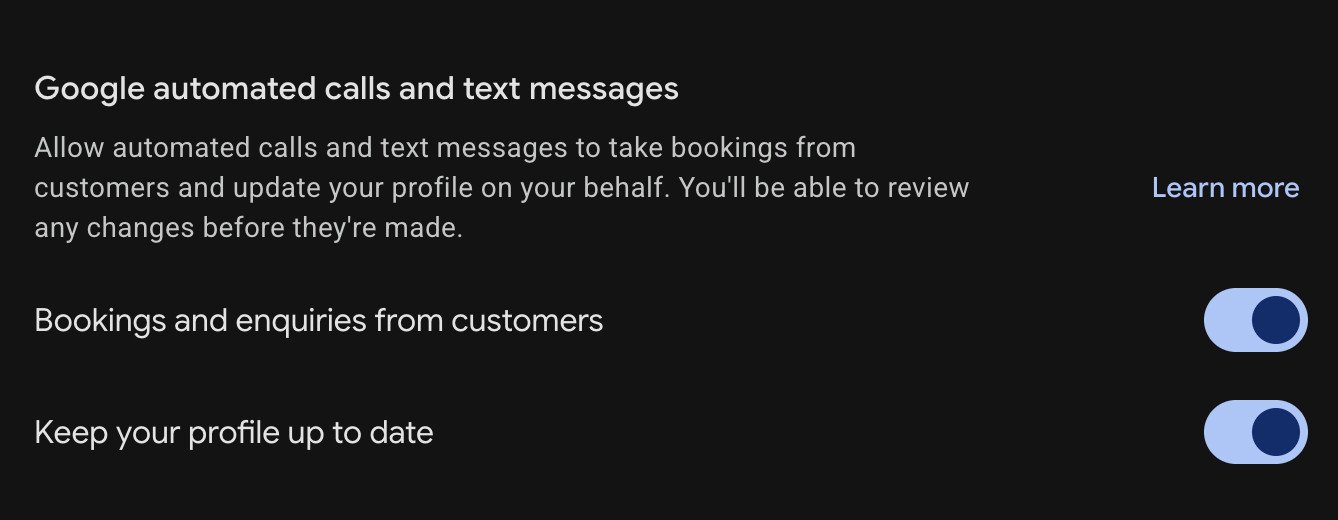
Google’s help documentation explains that these settings allow Google to contact a business to confirm details or assist with customer requests. Availability varies by region.
This is separate from the AI Messages inbox test described above. Seeing these toggles doesn’t confirm access to that inbox or a UK rollout of the messaging agent.
Clear business information gives AI better facts to work with
How up to date is your business information online? An AI agent answering on your behalf is only as good as the facts it can find. If a detail is missing or out of date, it either says nothing useful or repeats the wrong thing straight to a customer. Your Business Profile is a sensible place to start improving your information, although Google hasn’t confirmed whether this agent uses it.
Take a question a café might get: “Do you allow dogs in your outdoor seating area?”
| What’s published | Can it answer the question? |
|---|---|
| “Dog-friendly” and “Outdoor seating” attributes | Not clearly. These attributes don’t confirm whether dogs are welcome in the outdoor seating area. |
| “Dogs welcome on our covered terrace and in the front bar; water bowls available.” | Yes. It explains exactly where dogs are welcome. |
The second version helps a customer decide today, helps search engines match you to specific searches, and gives any AI system a fact it can repeat accurately.
How customers, search engines and AI use your content
The same clear, accurate information serves all three audiences, so there’s no need to write separately for AI.
| Audience | How they use your information | What helps |
|---|---|---|
| Customers | Scan your profile, photos, reviews and website to decide whether you meet their needs | Direct answers, readable layouts, obvious contact options |
| Search engines | Crawl and index your pages, then judge their relevance to a search | Crawlable pages, descriptive headings, internal links, accurate details |
| AI answer systems | Draw on available information to generate a reply | Explicit facts and policies, stated the same way everywhere |
Google’s own guidance on AI features in Search backs this up. It says AI Overviews and AI Mode have no extra requirements and need no special schema. It recommends the basics: keep important content in text form, make structured data match the visible page, and keep your Business Profile up to date. That guidance covers Google Search, not the messaging test, but the principle carries over.
What to do now?
These checks make your business information clearer for customers and easier for search engines and AI systems to interpret:
- Audit your Business Profile. Check opening hours (including bank holidays), phone number, categories, services, service areas and attributes.
- Replace vague attributes with specifics. Add the detail behind each one: covered or uncovered seating, step-free or not, free or paid parking.
- Answer common questions on your website. Cover prices and what affects them, booking rules, parking, accessibility, pets, cancellations and returns.
- Keep every source consistent. Your website, Business Profile, structured data and other listings should give the same answer to the same question.
- Decide who owns the handoff. If an AI ever answers first, someone still needs to pick up complaints, quotes and complex requests quickly. Agree who that is and how fast they respond.
- Keep direct contact easy. Make your phone number visible and, if available for your profile, add WhatsApp or text messaging.
FAQs
Has Google launched the AI messaging agent in the UK?
No. It appeared briefly in late June 2026 and was removed within hours. Google hasn’t announced it, and the reported sightings came from the US.
Can I turn it on for my business?
Not at the moment. There’s no setting to enable it. If it returns, it’s likely to show as a Messages button in your Business Profile dashboard.
Is an AI agent different from a chatbot?
A chatbot holds a conversation. An AI agent can also take actions towards a goal, such as booking or qualifying an enquiry.
Does this replace WhatsApp or text messaging on my profile?
There’s no sign of that. Those options remain in Google’s help guidance and are separate from the test.
Did Google remove Business Profile chat and chat FAQs?
Yes. Native chat, call history and the chat FAQ feature ended on 31 July 2024. That change is separate from the 2026 AI test. Read Google’s explanation.
Does structured data guarantee accurate AI answers?
No. Structured data helps search engines understand your pages, but it doesn’t guarantee how any AI phrases an answer. It should mirror the same current information customers can read on your site.
Get your information ready
Whether customers find you through Search, Maps or a future AI agent, the answers come from what you’ve published. SEO Paradise helps businesses audit and improve their Google Business Profile and website so those answers are accurate. Explore our SEO services.